Why Event Schedule?

After working on Invoice Ninja with my amazing partners Shalom and David for over a decade, I started thinking about what comes next. As developers often do, I ended up working on software to try to solve some of my own problems.

Problems

  1. I play bass in a Grateful Dead/70’s cover band. Sharing our schedule was harder than it should have been.
  2. Local shows were scattered across WhatsApp groups instead of a single, public calendar.
  3. The local farmers’ market is full of great vendors, but I’m too shy to ask about their products.

I wasn’t sure if I wanted to start yet another side project, but a strange thing happened when searching for a domain: one of my first .com choices was shockingly available. Clearly this was a sign.

We started working on Invoice Ninja because we saw the rise of the freelancer economy. With AI likely replacing jobs, people will start looking for new ways to make money. One option will be charging for local and online events. We can also leverage the many payment gateways supported by Invoice Ninja using a direct integration with the app.

Event Schedule is an open-source platform to share events, sell tickets and bring communities together.

Development Process

We’ve followed the same process we used for Invoice Ninja. Over the past year, we’ve slowly added users while developing the features they’ve requested. I’ve loved seeing the various schedules getting created. One of the highest traffic events was the Cyborx Festival in Germany. Another fascinating schedule is REinsTate – The Tate Institute, a Victorian community hub currently being restored in London.

A major milestone was our first organic testimonial.

As a seasoned business owner, and starting a Sound Healing venture that I require a booking calendar to be part of, Event Schedule has been great.

The ease of set up, attractive format, and most important – the support has been fast and effective – very important to any business owner.

I would HIGHLY RECOMMEND Event Schedule to others and look forward to seeing this app and company grow.

Kim Zacaruk, owner, Soul Zen Sound Baths

SEO is an ongoing challenge. Compared to Invoice Ninja, there’s a major advantage: the events are public. One area we’ve experimented with is an AI-generated blog. Over the past year, we’ve managed to start to gain some traction, but we still have a ways to go.
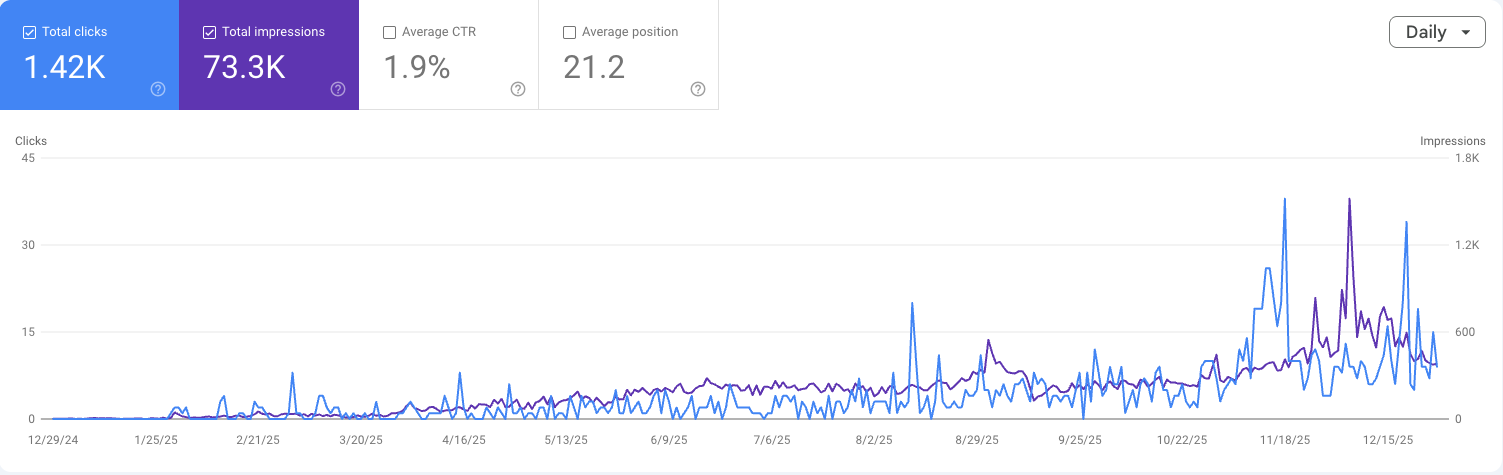
That said we’re playing the long game. We’re running our hosted platform on Digital Ocean’s App Platform, our total monthly running cost is currently $32, Digital Ocean charges $5 for the app and $15 for the database, while Gmail provides us two email addresses, each for $6. Using Gmail to send our emails limits us to 100 per day. Once traffic picks up, we’ll need to add $20 a month to support email, bringing the total running cost to $52. Not bad, if you ask me.

Although vibe coding is crazy fun, I’d hate to ship an app to production without knowing how to code. It seems like trying to drive a car while holding tennis rackets; you don’t have the control you need. At the same time, it makes a lot of sense for people with less coding experience to take a pre-existing open-source app and use AI to implement the specific changes they need.
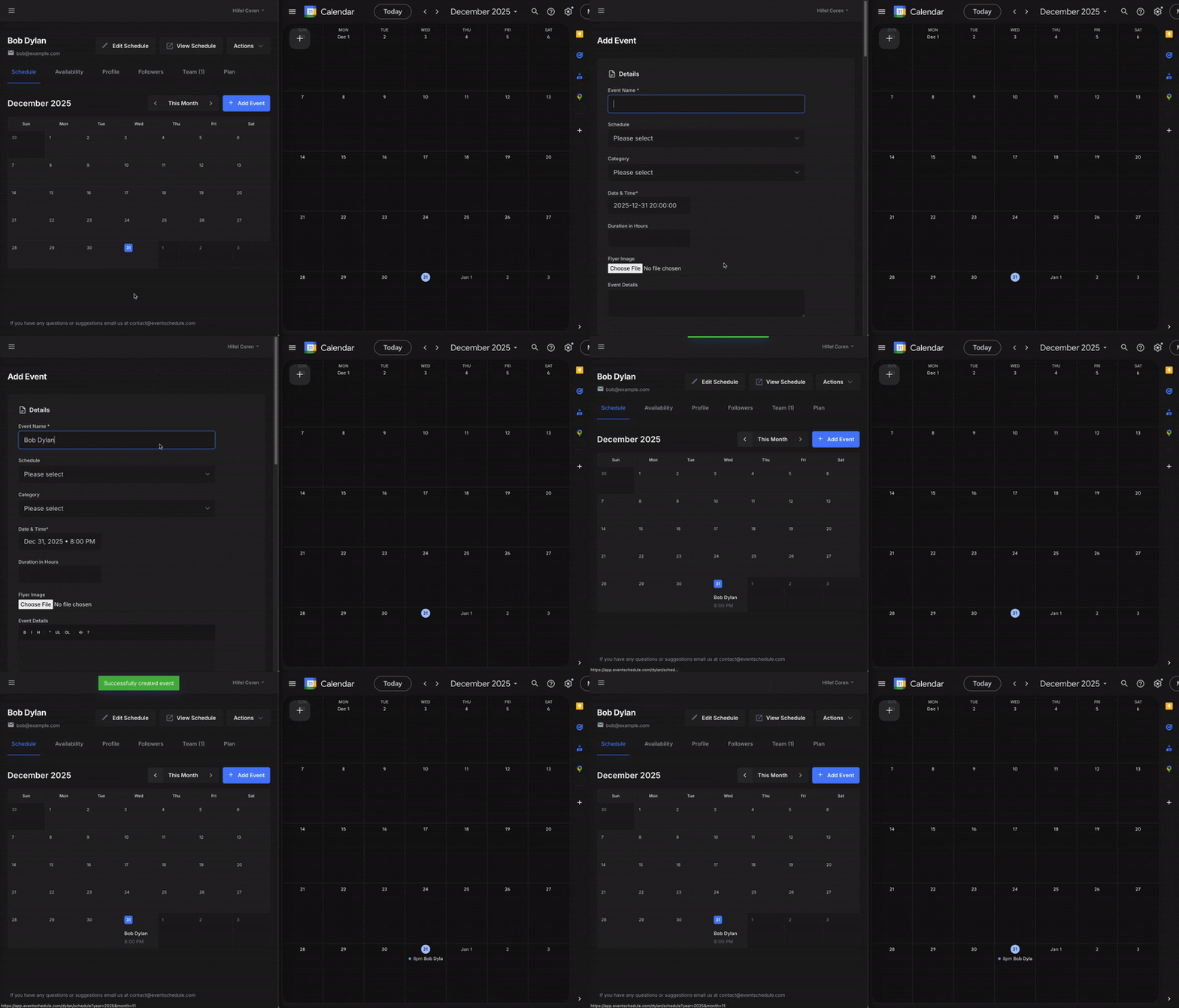
Google Calendar Sync

The app is built with Laravel, a framework that has been quite literally life-changing. It’s enabled me to support my wife and five children while being a work-from-home dad. I can’t thank Taylor Otwell enough for his work on it. For now we’re using a responsive web app to support mobile, but hope to build a dedicated Flutter mobile app in the future.

The platform supports both in-person as well as online events. With global events, it’s hard to have enough coverage to make in-person events useful, but we plan to provide a public listing of online events, enabling hosts to reach even larger audiences.

Marketing Strategy

Starting a new year, I’ve decided to take off my developer hat and switch to marketing mode (hence the video and blog post). I’ve been posting to Reddit from early on but my general plan moving forward was formulated after watching this great video from Marc Lou. There are three basic steps:

  • Short video leading to this post
  • Short video to announce Product Hunt launch and Q&A
  • Long video to showcase the product

Wrapping Up

Working in tech for 25 years, I’ve had the chance to experience many different developer roles, from working in a small startup to a large public company. I’m confident that developing a second bootstrapped SaaS is the best possible position to have. The income from the first SaaS pays the rent, enabling you to devote significant time to a second project.

I mention this because I believe developer satisfaction directly leads to developer success; a happy developer is a productive developer. Event Schedule isn’t about growth hacks or blitzscaling. It’s about building something useful and open, the same way we did with Invoice Ninja.

If you’re curious to follow along, I’d love for you to join us. Follow @ScheduleEvent and @HillelCoren for updates, and check out my personal schedule at hillel.eventschedule.com to see the upcoming Product Hunt launch and Q&A when it’s added.

Using multiple databases in Laravel for all queries

As we continue to grow our hosted Invoice Ninja platform we’ve been been looking into both vertical scaling [bigger servers] and horizontal scaling [more servers].

Initially we added more web servers using a load balancer. This was relatively easy to setup and as an added bonus provided higher availability. Over time however we’ve started to see our single database server experience increased memory usage, particularly after releasing our mobile apps.

Our plan was to simply divide our users across multiple databases. One database would function as the lookup server, the other databases would store the actual data.

Searching Google for ‘multiple databases in Laravel’ mainly returns examples of either specifying the connection for the particular query:

DB::connection(...)->select(...)

Or defining it in the model by setting:

protected $connection = ...;

However, if you’d like to use a different connection for all queries you can use:

config(['database.default' => ...]);

For our implementation we created a middleware class to find the database server with the provided credentials. The server is stored in the cache so the lookup is only required once every two hours, this is particularly helpful for the API where there’s no session.

To keep the lookup tables up to date we’re using Eloquent creating and deleted model events. Finally, to ensure our queued jobs use the right database we’re using Queue::before(...) to set it.

Laravel: TokenMismatchException error

A common cause for this error (assuming you’re correctly passing along the form token) is the form session expiring. This chunk of code will warn the user when the session is about to expire and enable them to extend it by making a simple get request.

Note: you’ll need to add a /keep_alive route which return ‘success’ (or any other value).


<div class="alert alert-warning" id="keepAliveDiv" style="display:none">
    This page will expire soon, <a href="#" onclick="keepAlive()">click here</a> to keep working
</div>


<script type="text/javascript">
    var redirectTimer = null;
    function startWarnSessionTimeout() {
        var oneMinute = 1000 * 60;
        var twoMinutes = oneMinute * 2;
        var twoHours = oneMinute * 120;
        setTimeout(function() {
            warnSessionExpring();
        }, (twoHours - twoMinutes));
    }

    function warnSessionExpring() {
        $("#keepAliveDiv").fadeIn();
        redirectTimer = setTimeout(function() {
            window.location = '{{ URL::to('/dashboard') }}';
        }, 1000 * 60);
    }

    function keepAlive() {
        clearTimeout(redirectTimer);
        $('#keepAliveDiv').fadeOut();
        $.get('{{ URL::to('/keep_alive') }}');
        startWarnSessionTimeout();
    }

    $(function() {
        startWarnSessionTimeout();
    });

Lessons Learned – Part 1

When I think back to when I just started working as a programmer I distinctly remember thinking I knew what I was doing. Almost 15 years later I now have the experience to know how wrong I was. We learn from failure and over the years I’ve had the chance to learn a lot.

I can never forget (still trying…) my first major screw up. I was just a couple of days at my new job working on a mailing list solution for a custom CRM. I had temporarily added a line of code to force the test emails to just be sent to my address. A few hours later my boss asked me to make an adjustment. While working on it he asked me about an email he’d received. Of course I’d forgotten to put back the line of code and had sent my test email to all 200,000 users.

Part of this was likely hubris, how could I possibly forget to set this insanely important line of code. Of course everything that can go wrong will go wrong. I had been testing with some pretty stupid emails, messages to myself and that sort of thing. Luckily the email the went out was just the word ‘test’. Mistakes will always happen, we need to create environments which prevent them.

Looking back this clearly should have been an environment setting. Laravel has an extremely useful ‘pretend’ setting in the email config file which prevents any emails from being sent, writing them to the log instead.

I’m a strong believer in the value of mistakes. Fool me once shame on you, fool me twice shame on me. The scars we get when bad things happen never fully heal which thankfully serve as reminders in the future. I’ve probably become a bit too paranoid now (especially when working with emails) but I’m sure it’s for the better.

Sign up below to be notified of future posts in the series or follow me on twitter @hillelcoren.

Friendly URLs with per-account incrementing Ids in Laravel

For Invoice Ninja we wanted each account to be able to use friendly URLs where their Ids would increment.

This would mean the URL for the first client they create would be https://www.invoiceninja.com/clients/1

Many accounts are stored in the same database so we’re not able to use the auto-incrementing Id field. The solution we’re using is to have all classes which store user data (ie, clients, invoices, payments, etc) extend the EntityModel class. To create a new instance you call the createNew() method.

Here are the benefits of this approach:

  • Context is tracked: The account and user the record belong to is automatically set. If an item is created by the system (ie, an automatically sent recurring invoice) the context can be inherited from an existing record.
  • Out of the box security: When setting foreign key values we use getPrivateId() to resolve the public id to a private table Id. This prevents the user from hand modifying the HTML to reference another account’s data.
  • Easy scoping: Using the scope() method we’re able to easily load data filtered by the account. For example Client::scope()->get() returns all of the accounts clients, while Client::scope($publicId)->get() returns a client using its public Id.

And finally the code…

class EntityModel extends Eloquent
{
	protected $softDelete = true;
	public $timestamps = true;
	
	protected $hidden = ['id', 'created_at', 'deleted_at', 'updated_at'];

	public static function createNew($parent = false)
	{		
		$className = get_called_class();
		$entity = new $className();
		
		if ($parent) 
		{
			$entity->user_id = $parent->user_id;
			$entity->account_id = $parent->account_id;
		} 
		else if (Auth::check()) 
		{
			$entity->user_id = Auth::user()->id;
			$entity->account_id = Auth::user()->account_id;			
		} 
		else 
		{
			Utils::fatalError();
		}

		$lastEntity = $className::withTrashed()->scope(false, $entity->account_id)->orderBy('public_id', 'DESC')->first();

		if ($lastEntity)
		{
			$entity->public_id = $lastEntity->public_id + 1;
		}
		else
		{
			$entity->public_id = 1;
		}
		
		return $entity;
	}

	public static function getPrivateId($publicId)
	{
		$className = get_called_class();
		return $className::scope($publicId)->pluck('id');
	}

	public function scopeScope($query, $publicId = false, $accountId = false)
	{
		if (!$accountId) 
		{
			$accountId = Auth::user()->account_id;
		}
		
		$query->whereAccountId($accountId);

		if ($publicId)
		{
			if (is_array($publicId))
			{
				$query->whereIn('public_id', $publicId);
			}
			else
			{
				$query->wherePublicId($publicId);
			}
		}
		
		return $query;
	}
}

I’m sure there are other ways to tackle this problem. Let me know in the comments or on twitter @hillelcoren if you have a different solution.

Logging errors in Laravel

Laravel comes with a really helpful Log::error() function to write messages to the log file. Here’s how you can use it to track PHP and JavaScript errors along with useful contextual information to help troubleshoot problems.

The Log::error() function accepts a second optional parameter allowing you to specify additional info. To make setting this easier create a logError() function in a Utils class.

public static function logError($error, $code = '', $context = 'PHP')
{
	$count = Session::get('error_count', 0);
	Session::put('error_count', ++$count);

	$data = [
		'context' => $context,
		'user_id' => Auth::check() ? Auth::user()->id : 0,
		'user_name' => Auth::check() ? Auth::user()->getDisplayName() : '',
		'url' => Request::url(),
		'user_agent' => isset($_SERVER['HTTP_USER_AGENT']) ? $_SERVER['HTTP_USER_AGENT'] : '',
		'ip' => Request::getClientIp(),
		'count' => $count,
		'code' => $code
	];

	Log::error($error, $data);
}

Most of the code should be self explanatory. getDisplayName() is a function I add to the User class (as well as other classes) where there is logic involved in determining the name. In this case it may be the user’s full name or email address.

To configure Laravel to use this function by default change the App::error() function in app/start/global.php to the following.

App::error(function(Exception $exception, $code)
{
	Utils::logError($exception, $code);
});

To catch all JavaScript errors enable accessing the Utils::logError() function by adding this to your routes.php file.

Route::get('/log_error', function() 
{
	return Utils::logError(Input::get('error'), '', 'JavaScript');
});

And finally, add the following to function to your master template file.

window.onerror = function(e) {
	try {
		$.ajax({
			type: 'GET',
			url: '{{ URL::to('log_error') }}',
			data: 'error='+e
		});     
	} catch(err) {}
	return false;
}